

On 6 November 2026, the Cilegon City Government started installing a real-time electronic taxation system at around 300 restaurants. Two business owners became the first sample connected to the UMKM system, and for businesses that do not yet have a cash register device, BPKPAD prepared one. After the data comes in automatically, the government no longer depends on manual reports submitted by taxpayers. In the CNBC Indonesia report, it is emphasized that the 10 percent restaurant tax has indeed been added to the bill, but there is a potential for unreported transactions. This guide walks you through starting a business with qasir step by step, from the very first account setup to your first month of sales.
There is one lesson that UMKM businesses can take from that news. Store operational data gradually moves from a notebook into a machine. In the future, business owners who can show tidy daily transaction records will find it much easier when dealing with the tax office, a bank, or a new business partner.
For a coffee shop or minimarket, the habit of recording every sale does not have to start when the business is already large. That habit can start from the very first day you open.
However, getting there needs more than a calculator and a notebook. You need a place to store the product list, a place to record transactions, a place to see daily sales figures, and rules for employees and outlets. Qasir prepares all of that, and the flow has already been explained in the official guide to starting a business with Qasir at the Qasir Help Center.
What Qasir Is and the Problems It Solves
Qasir is a digital cashier app, or point of sale, that can be used from a mobile phone. In the official guide, only six terms need to be understood: Qasir POS as the digital cashier system, Outlet Pusat as the main store that manages business operations, Outlet Cabang as a store under Outlet Pusat, Pegawai as an extra user with limited access, Qasir Pro as the complete package, and Qasir Pro Plus as the super complete package for large businesses. Some features are only available in the Pro and Pro Plus packages, so check the latest prices at bantuan.qasir.id before choosing a package.
The problem Qasir solves is not about being more modern. The problem is four gaps that are felt most in the first months: sales records are incomplete because the cashier only remembers the total money in the drawer, the stock list only exists in the owner's head so goods are ordered by guesswork, it is unclear which employee sold what when the drawer money does not match, and when the business grows into two outlets, everything has to be rearranged from scratch.
With a digital cashier, the numbers come from the same source as the sales records themselves. That is the core of starting a business with Qasir, and the next section breaks down the flow step by step, with examples from three types of business.
| Step | What You Do | Result |
|---|---|---|
| 1 | Register a Qasir account and complete your business details | An account ready for transactions |
| 2 | Create categories and add products with prices | A tidy catalogue and faster checkout |
| 3 | Connect a receipt printer to your device | Receipts printed for customers |
| 4 | Record your first sale | Revenue logged automatically |
| 5 | Track your starting capital and expenses | Cash flow becomes visible |
| 6 | Check the weekly sales report | Best sellers become obvious |
| 7 | Review stock and prices every month | Margins are not eaten by costs |
How to Start a Business with Qasir in 7 Steps
The flow in the official guide is deliberately kept short, because a business that is just starting does not need a complicated system. What it needs is a system that runs. These seven steps are enough to open a shop and start recording sales.
- Create an account. Register the business owner account first. This account is the owner of Outlet Pusat and the place where all reports are read later. The registration flow is explained in the official account registration guide.
- Add the products you sell. Fill in the name, price, category, and opening stock for every item. For a cafe, drinks and food are usually two categories. Details on entering products, including variations, are in the official product management guide.
- Set up the outlet. One shop is enough as Outlet Pusat. If you open a second location, add it as Outlet Cabang so both stay recorded in one account.
- Add employees. Create an account for each employee with the access they need. The official employee management guide explains the access levels.
- Connect a printer if you need receipts. A receipt is proof of purchase for the customer and a daily record for you. The printer setup guide lists the supported devices.
- Make the first sale. Use the digital cashier transaction feature to record a transaction, choose the payment method, then print the receipt. The digital cashier transaction guide describes the process.
- Monitor sales. Open reports to see daily sales, best sellers, and cash movement. The monitoring function guide explains what needs to be checked.
These seven steps do not have to be finished in one day. What matters most is that the product list and the employee accounts are ready before the first customer arrives, because those two are the most expensive to fix later.
Fits Three Types of Business
This feature is not limited to one type of business. Here are three examples so you can match it to your own store.
- Coffee Shop in Bandung — The thirty menu items are entered into two categories, drinks and food, complete with selling prices and opening stock in glasses and packs.
- Grocery Store in Surabaya — When one bottle of cooking oil sells, the stock goes down by one.
- Motorcycle Workshop in Solo — Services have a price without stock, while spare parts have a stock quantity that goes down every time one is sold.
Tip 1: Prepare Product Data and Prices Before Opening
Many new businesses get overwhelmed not because their products are unattractive, but because their product data is not tidy when they start selling. Prices that are still half remembered, categories that get mixed up, and variations that are unclear slow down transaction recording at exactly the moment the shop is busy. The safest approach is to prepare the product list with prices and opening stock once, then review it once a month so it does not drift away from market prices.
Need a reminder of other features? 5 application features that make running an MSM business more practical can be a useful extra read for preparing this initial data.
Tip 2: Do Not Forget to Print a Receipt for Every Transaction
A receipt is not just a formality. A receipt is proof that a transaction was recorded, and when there is a cash discrepancy or when you need to show sales data to someone else, the receipt is the easiest piece of evidence to find. Connecting a printer to the app only takes a few minutes, and many new business owners skip receipts for no clear reason. You can also hand the receipt to your customer as proof of a tidy purchase.
Tip 3: Check Sales Reports Regularly, Not Just Once a Month
The real value of a digital cashier app is not in the recording, but in reading the numbers again. If you only open the sales report at the end of every month, new problems are only noticed once they have already become losses. Opening the report every three to seven days makes small deviations visible quickly, for example when the margin on one product suddenly drops because the purchase price went up. A busy shop but which product sells best discusses how to read sales reports for product decisions.
FAQ: Starting a Business with Qasir
Is Qasir suitable for a business that is just starting and does not have many products yet?
Yes. Many Qasir users start with a single product or a single menu, then expand their catalogue gradually. All you need at the beginning is a product list, prices, and opening stock. A single Qasir POS account is already enough to record daily sales.
Do I have to connect a printer to use Qasir?
Not necessarily. Transactions are still recorded without a printer. Receipts are only needed if you want to give customers physical proof or keep an internal archive. You can connect a printer later, when the shop is not busy.
How long does it take to prepare the account and the first products?
For a single outlet with a few dozen products, preparation generally takes one afternoon. The official Qasir guide also explains the correct order of steps, from registering the account, adding products, adding employees, adding outlets, through to making the first sale.
What if the business has more than one shop or branch?
Each location is registered as an Outlet Cabang under the Outlet Pusat, so all transactions remain recorded in one account. The extra settings for opening and activating a branch outlet are explained in the official Qasir guide.
Can sales data be used for applications and paperwork?
Sales data and financial reports that are neatly arranged are often needed when you are dealing with documents, such as loan applications or business funding. The 2026 MSM KUR guide explains that tidy documents are usually requested earlier by prospective lenders.
Business and Finance Tips
Start with the most basic: separate business money from personal money from day one. This mixing often happens in small businesses, where cash drawer money and shopping money blend together, so at the end of the month nothing is left for capital. Do not use feeling, come on, start recording income and expenses explains how to separate them neatly.
Second, calculate the capital that is tied up in stock. In a grocery store, the goods on the shelves are money that has already gone out but has not yet become turnover. Understanding how much value sits on the shelves helps when purchase prices rise or sales slow down. Busy sales do not always mean big profit discusses how to calculate it in a simple way.
Third, set a capital limit before opening the shop, then write that limit where the whole team can see it. A written limit is far easier to keep than one that only exists in the owner's head.
Fourth, make sure every transaction has proof. Receipts, daily sales reports, and notes of payments to suppliers are best kept in one folder. These are the documents that are asked for when you need funding or support from someone else. The Condition of Indonesian MSMEs in 2026 summarises several of the challenges many MSMEs face when they need tidy paperwork.
Qasir Features for Running a Business from Zero
Digital Cashier for Recording Daily Sales
The digital cashier feature records transactions straight from the phone screen, complete with the payment method and receipt printing. For a business that is just starting, this makes daily turnover recorded automatically without having to count again from the book or from loose change.
Product Management for Building a Neat Catalogue
The product management feature stores the name, price, category, and opening stock of every item in one place. A neat catalogue speeds up product search during a transaction and makes the next goods order easier to place.
Outlet and Employee Management for a Growing Business
The central outlet and branch outlet features keep several shops recorded under one account, while the employee feature limits each person's access according to their responsibilities. Both are useful once the business is no longer run by one person alone.
Sales Reports for Reading the Numbers Instead of Guessing
The sales report feature shows daily sales, best selling products, and cash movement that can be read at any time. These numbers become the basis for choosing which goods to reorder and setting the next promotion. 5 application features that make running an MSM business more practical summarises the other features that business owners often use.
What the Qasir App Screens Look Like
The screenshots below come straight from the Qasir app, so you know exactly what you will see while using these features.
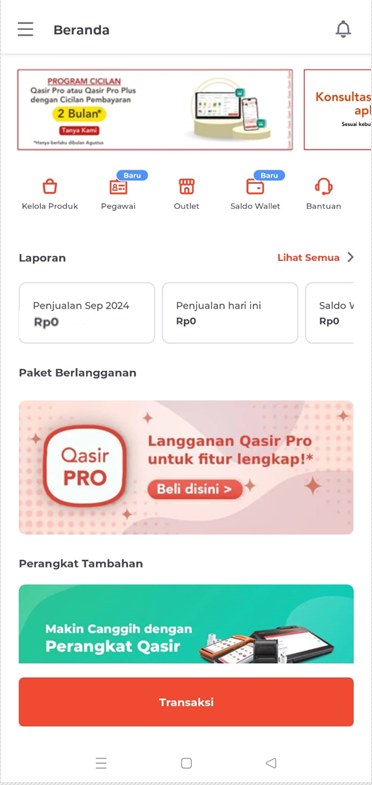
The Qasir app home screen: once your account is ready, every operational menu opens on a single screen.
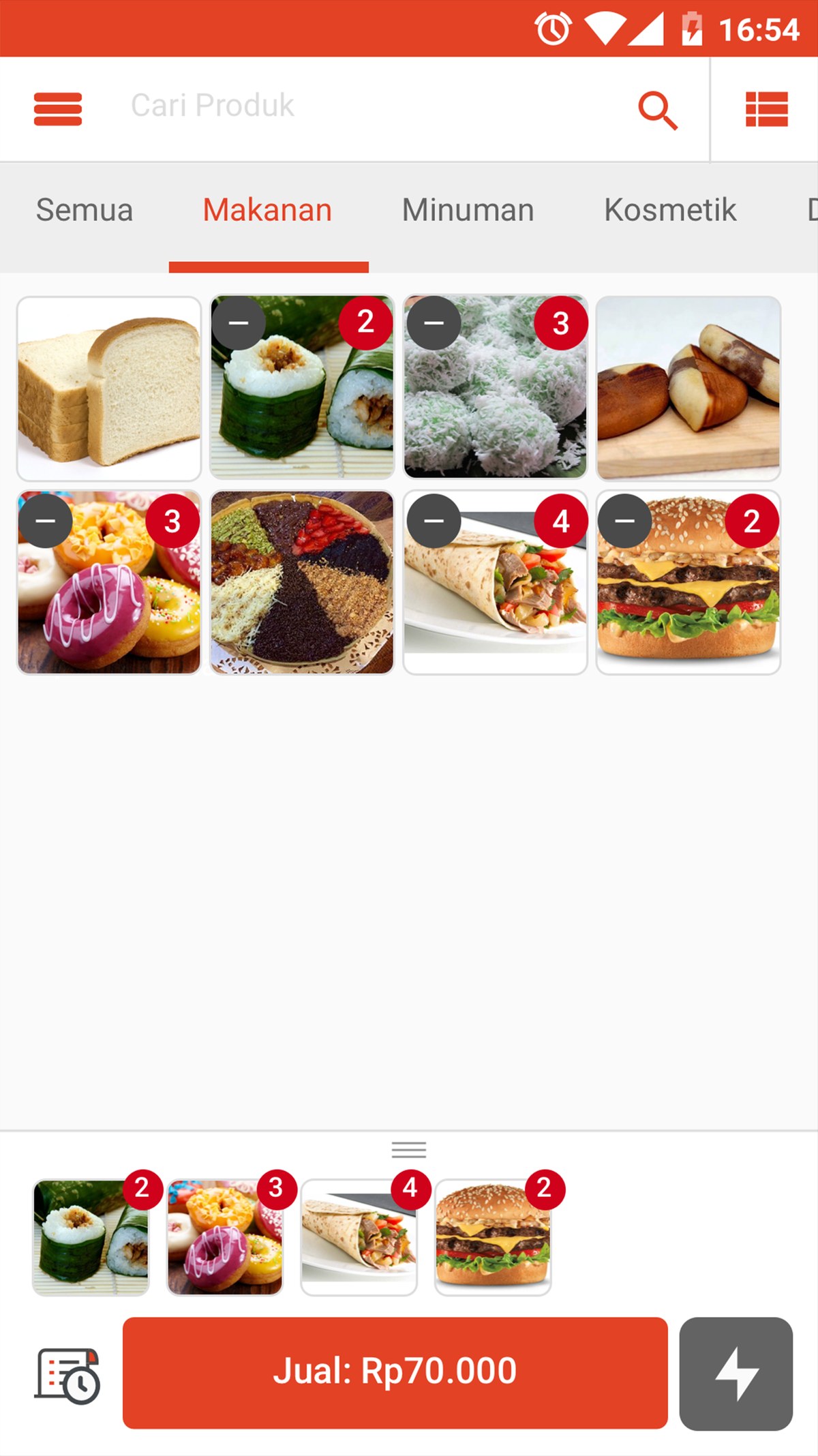
Qasir product catalogue: your stock and selling prices stay tidy from day one.
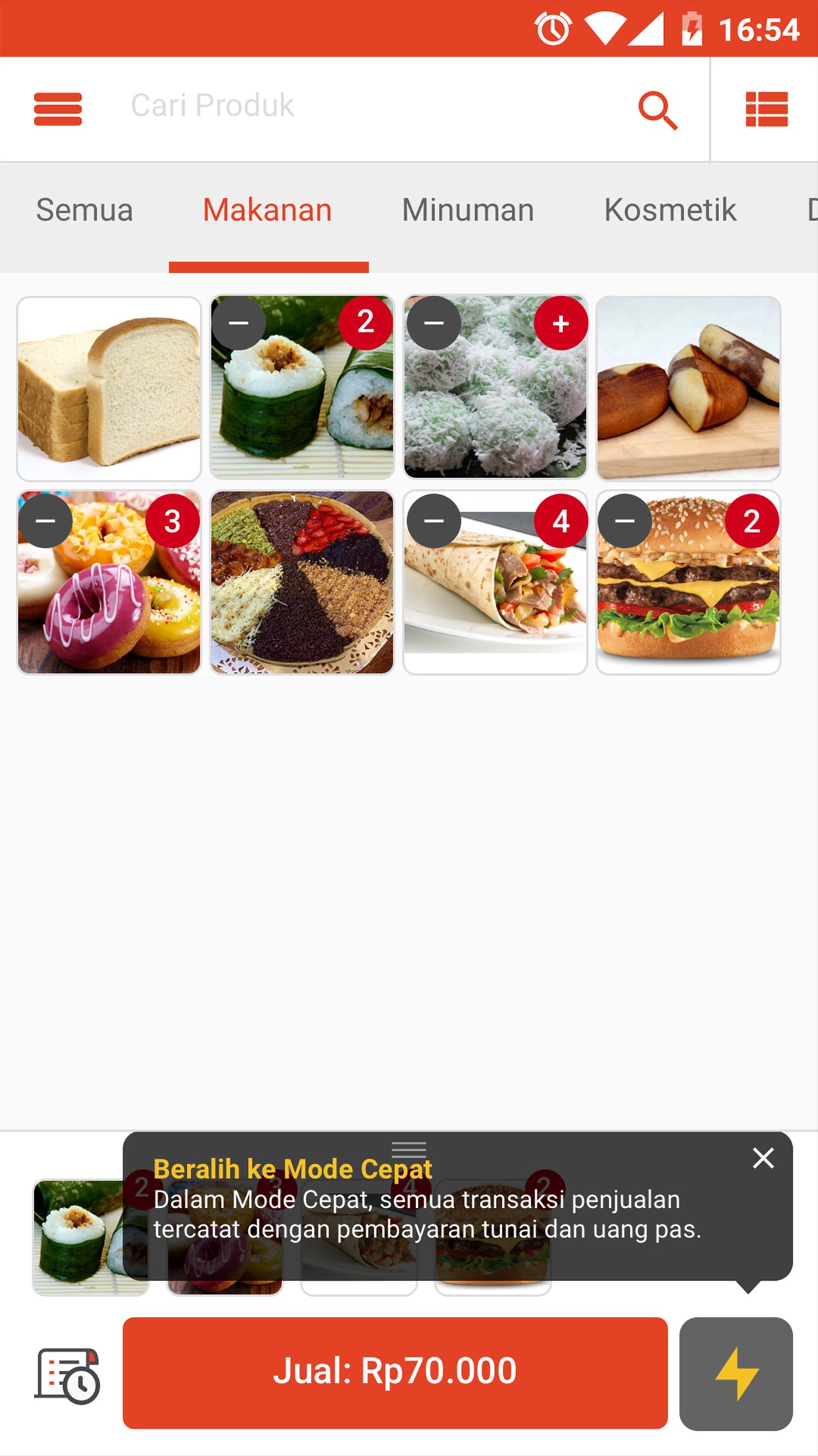
Qasir Quick Mode: a shorter checkout flow so the queue at your store never builds up.
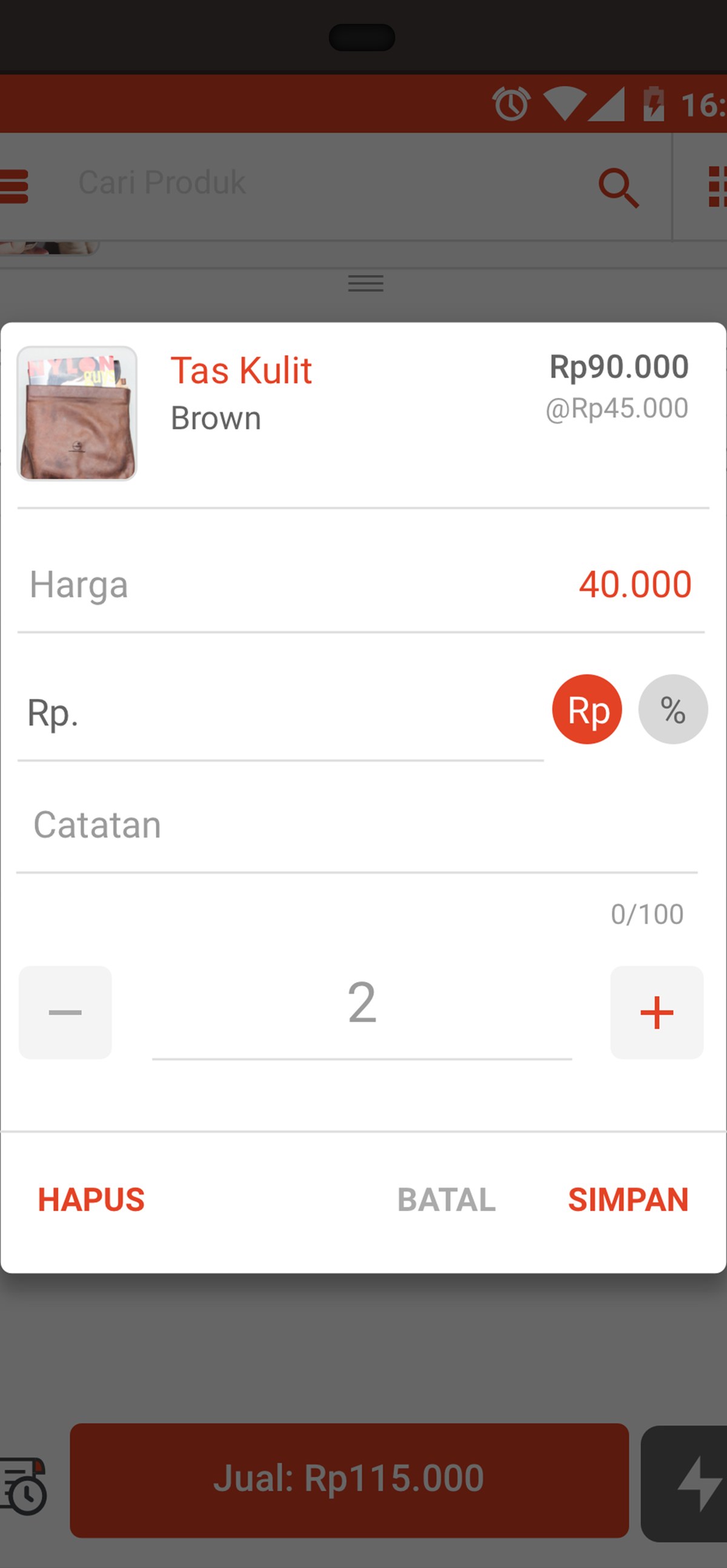
Set the price and discount right in the app, then save the sale in one step.
Conclusion
Starting a business with Qasir is basically about changing recording habits. The order is simple: create an account, enter the products, prepare the outlets and employees, connect a printer if needed, then make the first sale and read the report regularly.
The change is clearest in the three examples above. The coffee shop in Bandung finally knows which menu sells best. The grocery store in Surabaya can manage purchasing based on stock turnover. The motorcycle workshop in Solo can separate service income from spare parts income. In those three cases, the numbers that became available turned decisions that previously only existed as guesses.
The lightest way to start is with one outlet, one device, and a catalogue of what you really sell. Everything else can be added as the business grows, because all the data has been stored neatly from the start.
Ask the Qasir Team If Something Is Still Unclear
- Cash Recap and Cash In Cash Out to know exactly how much money came in and went out without recording manually.
- Stock Management so the number of goods always matches what is recorded on the shelf.
- Customer Data to recognise customers who often come back and to give them relevant offers.
- Wholesale Price Feature for resellers and customers who buy in large quantities.
- Queue Number and Table Number Feature for food and beverage businesses that get busy at certain hours.
If something about using this feature is still unclear, the Qasir Customer Happiness team is ready to help. Open the Help feature in the app or on the Qasir website and start a Live Chat. You can attach a screenshot or a video so the answer matches your case.
The full steps are in the guide to contacting the Qasir team. Ready to try it yourself? Download Qasir for free on the Play Store or the App Store.