
Opening
Indonesia's Ministry of Cooperatives and SMEs recently revealed: of 50 million SME players, only 25 million have onboarded to digital platforms. That means half of SMEs — including warungs and phone credit counters in villages and small towns — still record sales with notebooks. An even more startling figure: SMEs using POS apps number only around 450 thousand (KemenUMKM, Nov 17, 2026).
Meanwhile, AFTECH and the Ministry of SMEs signed a Memorandum of Understanding to accelerate SME financial management digitalization (Nov 26, 2026), while Bank Indonesia emphasized QRIS as the entry point for SMEs into the digital financial ecosystem. Every digital transaction is recorded automatically, building a financial track record that unlocks financing access.
Qasir's Transaction Feature (Digital Cashier) answers this gap: record sales from your phone, integrated with multiple payment methods, and automatically generate financial reports — without expensive EDC machines, without paper notebooks that easily get lost.
What Is Qasir's Transaction Feature (Digital Cashier)?
The Transaction Feature is the heart of the Qasir app — a digital cashier function allowing business owners to record buying and selling activities directly from their smartphone. Unlike conventional cashiers needing physical register machines, Qasir turns an Android phone into a complete cashier station: find products, add to cart, select payment method (cash, QRIS, transfer, card), apply discounts, save transactions, and print digital or physical receipts via Bluetooth printer.
All saved transactions automatically flow into sales reports, cash recaps, and profit-loss reports. Meaning, daily transaction recording simultaneously becomes the foundation of business bookkeeping — no double entry, no manual calculation at night.
How to Use Qasir Transaction Feature (5 Steps)
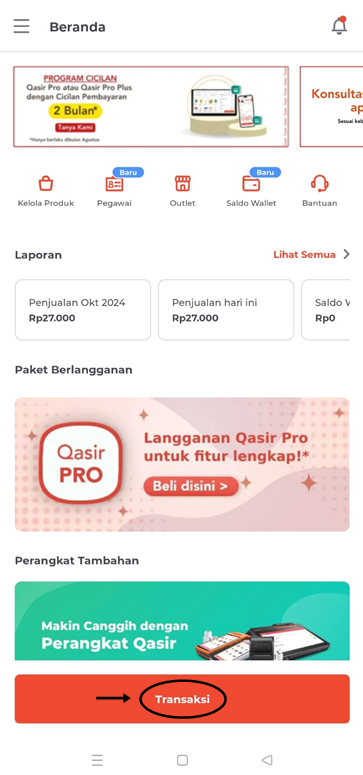
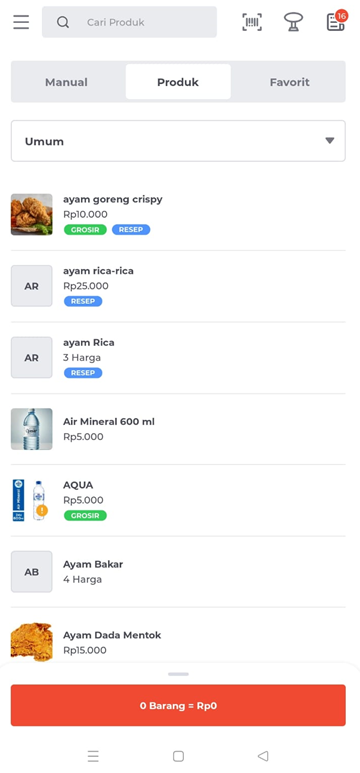
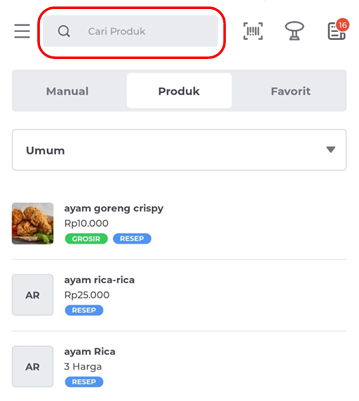
1. Open Transaction Menu — from Home, tap the Transaction button. The digital cashier screen is ready. 2. Find & Add Products — type product name in Search Products, or tap the Scan Barcode icon to scan with phone camera. Clicked products enter the cart automatically. 3. Adjust Quantity & Price — swipe item up for details: change quantity (+/- buttons), apply per-item discount (percent/nominal), or add special notes. 4. Select Payment Method — tap next arrow, choose Cash / Online Payment (QRIS) / Other Payment (Transfer, Debit, Credit, e-wallet). Can combine: part cash, part QRIS. 5. Complete or Save — tap Exact Amount for speed, or enter paid amount + change. Can Save Transaction (waiting for customer to pay later) or Delete Transaction if cancelled. Completed transaction -> digital receipt ready to send via WA / print Bluetooth printer.
Additional features on payment screen: Additional Charges (delivery fee, service charge, etc.) with mandatory description, and Tax auto-calculated for products configured as taxable in Settings -> Tax.
Fits Three Types of Business
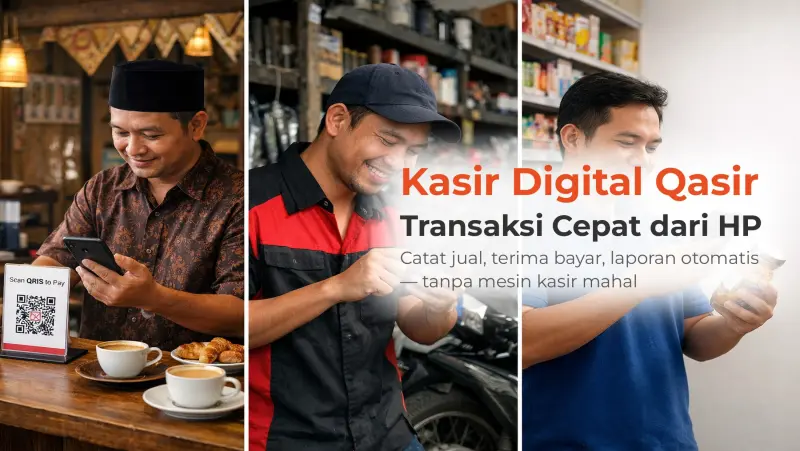
- Coffee shops & beverage stalls — fast transactions during morning/evening rush, scan barcodes for bottles/packaged drinks, split payment cash + QRIS for Gen Z customers, digital receipts auto-sent to customer WhatsApp.
- Motorcycle workshops & light service — record services + spare parts in one transaction, additional charges for service/delivery fees, save transaction waiting for vehicle pickup, sales reports by service vs parts category.
- Convenience stores & minimarkets — fast barcode scanning for hundreds of SKUs, manage wholesale/retail discounts per item, multi-payment including transfer & debit cards, daily cash recap auto-generated for store closing.
Tip 1: Enable Auto Tax for Specific Products
In Settings -> Tax, create tax rules (e.g. VAT 11%, local tax 2%) then assign to taxable products. During transactions, tax calculates automatically and separates on receipt — customers see clearly, tax reports accurate, you stay calm during audits.
Tip 2: Use "Save Transaction" for Delivery/Pickup Orders
Customer orders via WA/GoFood but pays later? Tap Save Transaction — cart saved, stock reserved, receipt ready when customer pays. Fits coffee shop deliveries, construction store COD, or workshop service pickup later.
Tip 3: Combined Payment Methods = More Customers Served
Don't force one method. Enable Cash + QRIS + Transfer + Card. Gen Z prefers QRIS, housewives prefer cash, corporates prefer transfer. All recorded neatly in one daily sales report — no manual recap per method.
FAQ
Can Qasir record transactions offline (without internet)? Yes. Transaction feature works fully offline: find products, add to cart, pay cash, save transaction. Data stored locally and syncs to cloud when phone connects to internet. Suitable for weak signal areas or outdoor bazaar events.
Can digital receipts be sent to customer WhatsApp? Yes. After transaction completes, tap Share Receipt -> select WhatsApp -> send to customer number. Receipt contains item details, discounts, tax, total, and verification QR code. Free, no paper printing.
How to record partial payment transactions (installments/DP)? Use Save Transaction to record order with DP. When customer pays balance, open saved transaction -> continue paying remainder. Or create new transaction for balance, note in description "Balance payment for invoice #xxx".
Is thermal printer required for printing receipts? Not required. Digital receipts (PDF/image) are complete for legal & customer verification needs. Bluetooth thermal printers (like M58, T58, or official Qasir printers) only needed if customer requests physical paper receipt.
How to fix transactions with wrong input (quantity/price)? If transaction not completed: swipe item -> change quantity/price. If already completed: use Stock Adjustment for stock correction, and record correction in Cash In/Cash Out with note "Correction transaction #xxx". Void transaction feature available for admin/owner.
Business & Finance Tips
1. Separate business and personal funds from first transaction Use Qasir cash recap to record every business money in/out. Don't mix family shopping money with store revenue — this is the main reason SMEs don't know real profit/loss.
2. Don't just record revenue — record daily operational costs too Electricity, water, staff wages, rent, stock purchases: enter into Cash Out Qasir daily. Auto profit-loss report will show net margin, not just gross revenue that deceives the eye.
3. Use peak hour data for staff scheduling & stock Sales report per hour (in Qasir) shows transaction peaks. Schedule most staff during peak hours, stock best-selling products before those hours. Labor & capital efficiency = bigger profit.
4. Build financial track record for financing access Banks & fintech (Qapital, KUR, etc.) need 3-6 months cash flow proof. Daily Qasir transactions that are tidy, synced to financial reports, become the strongest "digital proof" — faster approved than neat but manual notebooks.
Qasir Features for Transactions
| Feature | Benefit for Coffee Shops | Benefit for Workshops | Benefit for Convenience Stores |
|---|---|---|---|
| Digital Cashier | Fast queue during rush, scan beverage barcodes | Record services + parts in one transaction | Scan hundreds of SKUs, manage wholesale/retail pricing |
| Auto Reports | Daily recap without manual evening calc | Reports by service vs parts category | Auto cash recap for store closing |
| Auto Wholesale Pricing | - | - | Dual-price auto-applied when qty meets criteria |
| Flexible Discounts | Happy hour promo per item/transaction | Service discount for loyal customers | Wholesale & retail discounts separated in reports |
| Additional Charges | Delivery/shipping fees | Service fees, vehicle pickup delivery | Packing fees, delivery charges |
| Auto Tax | VAT on packaged drinks auto-calculated | Service & goods tax separated | VAT on taxable products auto-calculated |
Digital Cashier for Fast Sales Recording
Record sales transactions from Android phone without EDC machine. Find products via name or camera barcode scan, add to cart with one touch, process multi-method payment in seconds. Saves customer queue time and eliminates manual calculation errors.Auto Sales Reports from Every Transaction
Every saved transaction automatically enters sales reports: daily/monthly summary, detail per product, per category, per payment method, per cashier/staff. No manual evening recap needed — open report, numbers ready.Auto Wholesale & Retail Pricing in Transactions
Set wholesale price (min buy X units) and retail price in product master. During transaction, Qasir auto-applies wholesale price when quantity meets criteria. Fits convenience stores, wholesalers, and distributors with dual pricing.Flexible Discounts per Item & per Transaction
Give percent or nominal discount per item (e.g. "10% off this item") or total transaction discount (e.g. "deduct Rp5,000 total purchase"). Discounts recorded separately in reports — promo effectiveness analysis becomes easy.Additional Charges (Delivery, Service, Packing Fees)
Add extra charges with mandatory description: shipping, service charge, packing fee, delivery fee. Separated from product value, transparent on receipt & reports. Mandatory for delivery businesses, workshops, and services.Auto Tax per Product
Configure tax rules in Settings (VAT, income tax, local tax) and assign to taxable products. During transaction, tax calculates automatically, displays separately on receipt, and accumulates in tax report — ready for VAT period filing.What the Qasir App Screens Look Like
Main transaction screen: find products by name or barcode scan, add to cart, select payment method.
Multi-method payment screen with additional charges (delivery, service, packing fees) and auto tax.
Complete digital receipt with item details, discounts, tax, total, and verification QR code — ready to send via WhatsApp.
Conclusion
Qasir's Transaction Feature (Digital Cashier) turns a smartphone into a complete cashier station: record sales fast, accept multiple payments, auto-generate financial reports. For 25 million non-digital SMEs and 450 thousand new POS users, this is the most realistic step to start digitalization — using existing Android phone, free download, 7-day trial.
Tidy daily transactions aren't just recording. They're the foundation of financial reports that unlock financing access, reveal real margins, and enable data-driven business decisions instead of gut feeling. Start with one transaction today.
Ask the Qasir Team If Something Is Still Unclear
- Edit Brand & Category in Qasir — edit brand name & product categories directly from phone
- Barcode Scan in Qasir — phone camera becomes barcode scanner for fast product entry
- Qasir Manage Products — manage stock, wholesale/retail prices, product variations in one place
- Connecting Thermal Printer with Qasir App — connect Bluetooth printer for physical receipt printing
- Qasir Supervisor Access Rights — restrict staff access: cashier, warehouse, admin, owner
If something about using this feature still puzzles you, the Qasir Customer Happiness Team is ready to help. Just open the Help feature in the app or on the Qasir website, then start Live Chat. Feel free to attach screenshots or videos for more precise answers.